Monday, March 17, 2014

Johnny's - IEP Goal: Setting up a Writing Station

Johnny's IEP Goal is to independently set up a writing station 80% of the time.  He has difficulty using one hand.  He can gather his needed materials but waits for the staff to set up the writing station.  One way to facilitate him doing this is for the staff to put together a "basket" of his writing materials.

Once he has all of these materials, the staff can put together a short checklist of items that he needs to use and the correct order.  This checklist can be on a clipboard in his basket, so everything is one-stop shopping.

This is a sample of a checklist for writing that could be modified for Johnny's needs.


Tuesday, March 11, 2014

Choice Cards for Students with ASD

In my last post, I wrote about break cards as a wonderful visual tool to use with students with ASD who have challenges with verbal communication.  An additional tool to help students with ASD succeed in the classroom are Choice Cards.

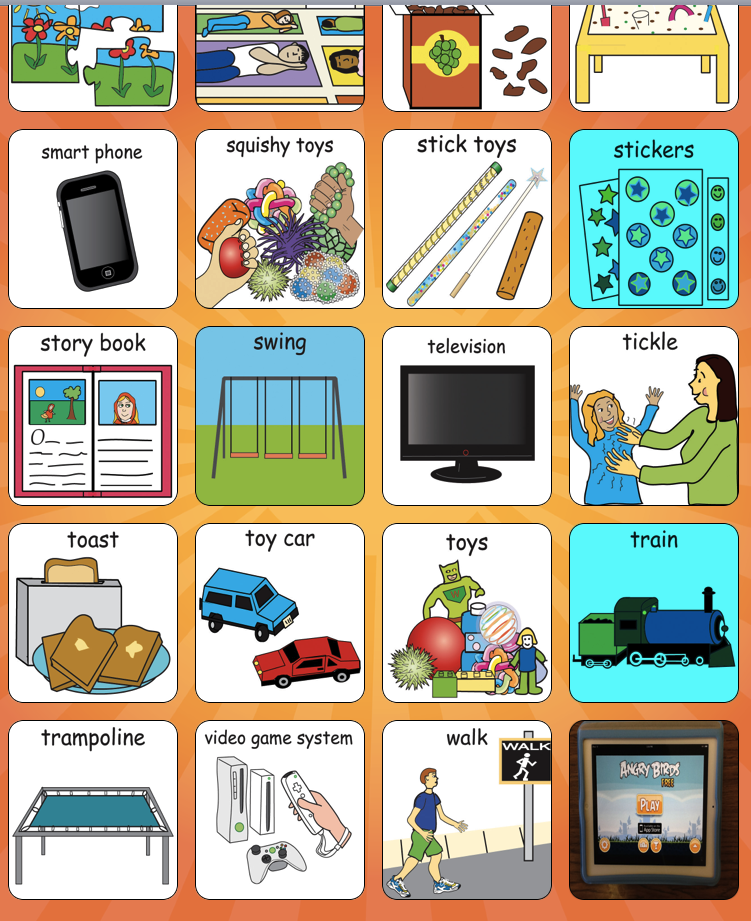
Choice cards are pictures that allow students a visual choice between two or more images.  Students can point to, nod towards or even verbally state their preference.  Choice cards are useful as students are typically less likely to "act out" when given a choice.  It makes the individual feel some power and/or control over their learning environment.  They are especially helpful for kids who cannot speak clearly or have limited vocabulary and are easy to use and low-tech.

Some examples:
                

Break Cards for students with ASD


In the previous post, I discussed some of the challenges with communication that students with ASD face.  One challenge may be simple communication of the need to step outside of the learning environment to take a break from instruction.  The individual may be bored, frustrated or too challenged with what is going on in this classroom.  The break could allow the individual to go to a sensory room where they can receive needed input or it can just be to diffuse some tension that has been building up. 

If a student has challenges with verbal communication, a card that states or shows the need for a break can be a simple tool.  The cards work especially well for students who are strong visually as they show they requested action (and it can also be written).  Of course, students still would need to be monitored to see if indeed the break is providing a time to diffuse some tension OR if it is just a way "to get out of class".

Students on the Autism Spectrum - Challenges they Face with Communication


The rate of diagnosis of kids with ASD is growing, some now say 1 in 88 children born has a form of autism.  Whatever, the numbers, we as educators are faced with helping these students succeed in our classrooms.  In order to help them succeed, one thing we need to understand is their communication challenges.

Students with ASD typically face challenges when communicating with others though the degree of their difficulty varies.  Often a student with ASD develops speech differently and more slowly; kids with autism may be more interested in sounds in the environment (like a ticking clock) than people speaking.  They typically do not imitate in the same way that other kids do - for instance they may not imitate at all OR they may imitate an entire sentence though they may say it without understanding it.  There are often delayed with speech especially if they do not echo language or remain non-verbal. 

In terms of older students, some with mild autism may have extensive vocabulary.  Though even with these high-functioning ASD kids, they typically have difficulty with social communication as reading body language and facial cues is an essential part to understanding nuance and context.

Therefore, regardless of how high or low-functioning an ASD kid is with speech almost all can use some training and assistance with communicating with others.  As a teacher, it is imperative to see where they are with their communication skills and help them to develop them further.

Source: http://www.hanen.org/Helpful-Info/Autism-Corner/How-Autism-Affects-Communication.aspx

Also, below is a list of specific challenges that kids with Autism face with social communication:
communicate-words-from-mouth

  • People with what appears to be perfectly grammatical speech
  • Absence of any desire to communicate
  • Echolalic and repetitive speech
  • Expression of needs only
  • Makes factual comments, often irrelevant to the social situation
  • Talks incessantly regardless of response by others
  • Literal interpretation
  • Referring to self in third person impairment of imagination
  • Difficulty in understanding that other people see things from a different point of view
  • Inflexibility in the application of both written and unwritten rules that govern social behaviour
  • Repetitive enacting of roles without understanding purpose
  • Difficulties in generalising concepts
  • Literal understanding of language
  • Difficulties in distinguishing between ‘pretend’ and reality
  • Lack of empathy for others.
  • Impairment of creative imaginative concepts

Social relationships

  • People with autism have difficulties forming relationships; they often appear aloof and indifferent to other people.
  • Many people with Asperger Syndrome want to be sociable, but may lack the social skills to interact in a conventional way. They find it hard to understand non-verbal signals, including facial expressions, which make it difficult for them to form and maintain social relationships with people who are unaware of their needs.
  • Difficulty understanding the ‘rules of society’ and identifying what is expected behavior in different situations.
Source: http://www.brookdalecare.co.uk/what-is-autism

IEP Considerations and Assistive Technology

Assistive Technology umbrella: Devices, Services; Considering, Evaluating, Implementing.

The IEP process under the latest renewal of the IDEA requires that all schools consider Assistive Technology when creating and/or reviewing an IEP.  All team members must provide input and one process that is in place to see whether low, moderate or high-tech tools can help a student is called SETT.

SETT stands for student, environment, tools and tasks.  Each component is essential to take into consideration when deciding whether AT can help.  In previous blogs I discussed many different types of AT from different types of keyboards to computers that work with voice activation.  I am excited to have this knowledge when I am part of an IEP team; as an educator I can detail the environment and the tasks that are required in the social studies classroom.  I am committed to helping my students with IEPs succeed to the best of their abilities.

Monday, February 24, 2014

Varying Perspectives on the Use of iPads


In my last blog, I went over varying uses of iPads, this blog seeks to showcase varying perspectives on their usage.  I will examine parental, child and educators viewpoints.
Parent with Child looking at iPad
1. Parents: Many parental perspectives were largely positive in the interview I read but some criticisms were present.  On the positive side, parents made comments about how the iPad is more motivational for their kids; they said it encourages collaboration and communication with peers; they stated students are more willing to share their projects with them; and there is often greater student independence when they are using an iPad.  On the other hand, the parental criticisms included an increasing amount of arguments over usage time; it sometimes is harder for students to check answers as compared to using a textbook, students emailed their parents during the school day with it and sometimes they said the amount of time a child spent on an iPad project was too long.


Children: I focused on an individual child, Carly Fleishman for a young person's perspective on iPads.  She was featured in a "Medical Mysteries"  video and it showed her journey to becoming able to communicate with using similar technology.  While she did not specifically focus on usage of an iPad, her progress clearly showed the potential benefits of it as a communication device.  Carly who cannot speak was thought to be mentally challenged; once she began to type it was clear she has an agile and capable mind.  Her story clearly demonstrated the positives of assistive technology.  As a communication tool it could be an amazing opener to children of all abilities and it's portability and versatility are surely impressive.  

On a side note, I watched a second video called "Carly's Cafe".  Carly and her dad made it and it is  eye-opening as she demonstrates how an autistic person sees the world.  It clearly shows the struggles she has and thereby implies the relevance of AT.  http://www.youtube.com/watch?v=KmDGvquzn2k
 
Teachers:  An interesting review in the LA Times, looked at a Los Angeles' rollout of a $1 billion iPad program.  Only 36% of the teachers strongly favored continuing the program.  Many cited problems with the iPad curriculum, issues with connectivity, security concerns (many students when receiving the iPad immediately removed the security controls), the storage of information and issues even with signing on.  These results initially surprised me but on the other hand, it takes training to use the iPad, not only as a tool, but also how to use the apps.  Many of the teachers cited lack of training as an impediment for using the device.   It certainly appears there is still a lot of work to do in this LA school district, in order for iPads to be deemed a success.

Despite many varying viewpoints: I believe iPads can play a relevant and important part in the high school.  They are portable, able to access a great deal of information, and they are adaptable to students of varying abilities.

Sources:

Carly's Journey:  http://www.youtube.com/watch?v=F4XMlhCfp3Q

Teachers: http://www.latimes.com/local/la-me-ipads-survey-20131202,0,2314290.story#axzz2uFxlwQpn

iPads in the classroom for students with special needs - reflection on a Youtube Video


As discussed in my last blog, tablets (and iPads) are great teaching resources.   A video I watched (see link below) focuses on using the iPad with very young students with complex special needs.  Though the title of the video focuses on autism, the speaker Lauren Meaty an OT demonstrates many apps that can be used for a variety of purposes including helping those with physical disabilities, limited communication skills and developmental disabilities.

One of her examples touched on a girl with quadriplegic cerebral palsy who was very fisted; Lauren introduced a simple app called Magic Piano.  Almost in the first moment she demonstrated the app, the girl showed high interest and opened both of her hands to touch the keyboard.   It is amazing how motivating an app can be for a physically challenged student.

Another example in the video focused on triplets, each who had varying abilities.  One could speak, one had good receptive skills but not very verbal, and the third was working on receptive language.   Lauren used an app called Sound Touch that showed a picture of a cat and the verbal triplet said that it was a cat.  The triplet who could not communicate yet at all was asked to pick out a cow - and was able to successfully demonstrate this by touching the screen.  This child received feedback from both Lauren and the iPad as it emitted the sound "moo".   Both kids  were able to interact with the same app successfully despite having different needs.  In addition, this app varied its pictures and sounds; so it also taught generalization of the idea of a cow (e.g. not all cows look the same). 

 
There was student with Downs Syndrome who did not want to write; Lauren introduced the app Skywriters and it showed her how to write (moreover, the app would not let her write a letter incorrectly).  Over time, the OT introduced writing with pen/paper & alternated this with the iPad.  She successfully taught the student good writing skills with the iPad being a motivating medium. 

I have used the iPad in the classroom and find the high school student is typically at ease when using it.  I would love to use the iPad more and hope to find more apps that are appropriate for the high school level.   I am currently using an app called Videolicious which allows the user to make 1 minute videos at home.  I think it could be a cool way for students to demonstrate their knowledge on a topic or issue.  This could engage more students and would incorporate elements of UDL as it is an alternate medium for presenting knowledge.
http://www.youtube.com/watch?v=FGU1ELjS7bQ